BenchTwin › Arduino simulator
Arduino simulator, free and online
Wire an Arduino Uno, Nano or Mega to LEDs, buttons, sensors, displays and motors on a 3D bench, write your sketch and press Simulate. LEDs light, servos turn, screens draw and the serial monitor talks back, all in your browser.
Open BenchTwin, free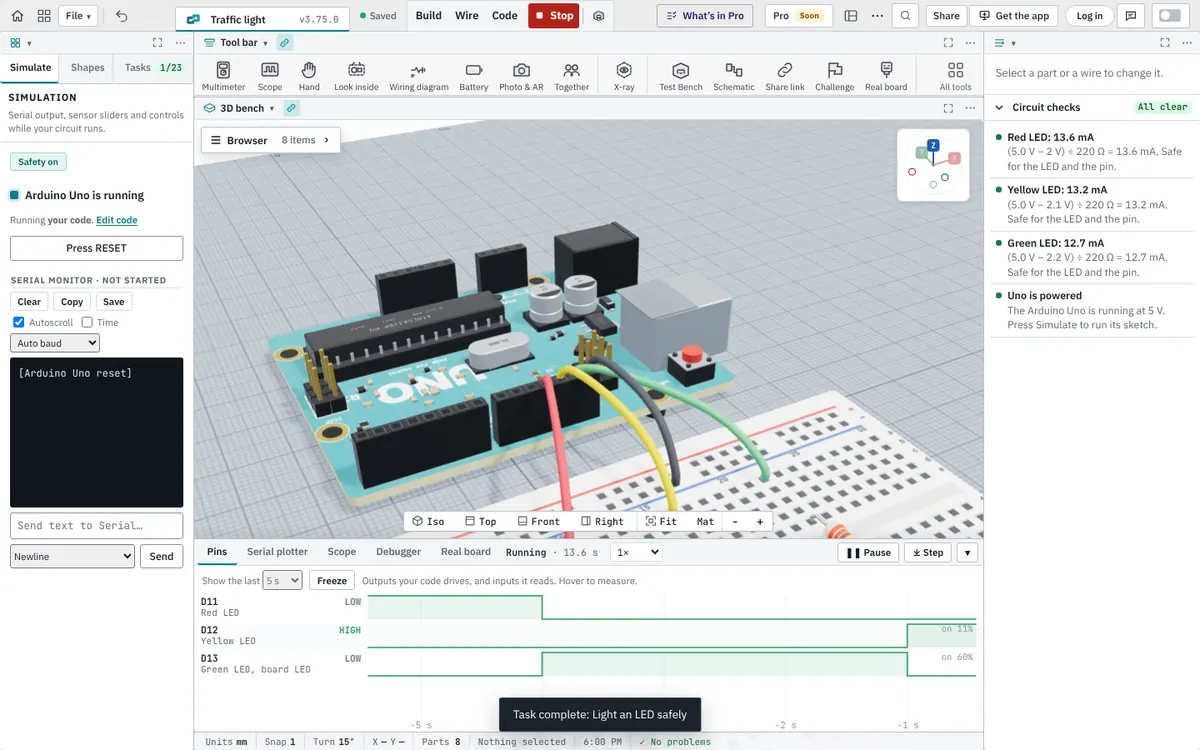
Arduino boards you can simulate
The Arduino Uno R3 and Uno R4, Nano and Nano Every, Mega 2560, Leonardo, Micro, Pro Mini and Due, each with its real pins: the PWM pins marked with a ~ do PWM, A4 and A5 are I²C on the Uno and Nano, pins 0 and 1 are the USB serial link, and a Mega has its extra serial ports.
Write a normal Arduino sketch
BenchTwin runs ordinary Arduino code: setup() and loop(), pinMode, digitalWrite, analogRead, analogWrite, millis(), interrupts, Serial, Wire and SPI, with plain-language messages when something is wrong. These libraries are simulated with the parts they drive:
| What | Libraries |
|---|---|
| Motors | Servo, Stepper, AccelStepper, L298N, Adafruit PWM Servo Driver (PCA9685) |
| Displays | LiquidCrystal and LiquidCrystal_I2C, Adafruit_SSD1306, Adafruit_SH110X, U8g2, Adafruit_ILI9341, Adafruit_ST7789, TFT_eSPI, TM1637Display, LedControl |
| Lights | Adafruit_NeoPixel, FastLED |
| Sensors | DHT, DallasTemperature, NewPing, HX711, BH1750, Adafruit_BME280, Adafruit_BMP280, MPU6050, VL53L0X, Adafruit_INA219, Adafruit_ADS1X15, Adafruit_MLX90614 |
| Input and timing | Keypad, Bounce2, Encoder, IRremote, RTClib, PID |
| Communication and storage | SoftwareSerial, MFRC522 (RFID), RF24, LoRa, TinyGPSPlus, SD, EEPROM |
Code > Libraries in the app lists all 75, each with an example sketch and a button that adds the part it works with.
Debug it like a real bench
- Serial monitor and serial plotter for what your sketch prints.
- Pin timeline: every pin the code drives or reads, over time.
- Multimeter and oscilloscope on any wire while the circuit runs.
- Circuit checks explain mistakes before they cost a part: an LED without a resistor, a pin asked for more current than it can give, 5 V on a 3.3 V module.
- Sliders for sensors: change the temperature, the distance or the light and watch the code react.
Start from a working project
Starter projects include a traffic light, a volume knob, a weather station, a night light, a radar, a robot car and a line-following robot. Open one, change it, and when it works, Build it for real gives you the shopping list, the wiring and the code. Want to learn from the beginning? The BenchTwin course walks you through wiring and Arduino code one step at a time.
Questions
Is this Arduino simulator free?
Yes. BenchTwin is free to use while it is in beta, in your browser, with no download. A free account saves your projects to the cloud.
Can I simulate Arduino code with libraries?
Yes. 75 libraries are simulated, including Servo, LiquidCrystal_I2C, Adafruit_SSD1306, Adafruit_NeoPixel, DHT, HX711, NewPing, Keypad, IRremote and MFRC522. A library BenchTwin doesn’t simulate yet is listed with a way to ask for it.
Does the Arduino simulator have a serial monitor?
Yes, and a serial plotter. You can also type into the serial monitor to send text to your sketch.
Can I use a breadboard?
Yes. Breadboards work like real ones: the five holes in a row are connected, the power rails run along the sides, and a part across the middle gap is on two separate rows.
Can I put my code on a real Arduino afterwards?
Yes. The code is ordinary Arduino code, so you can paste it into the Arduino IDE. Build it for real gives you the parts list and the wiring for the real build.
More from BenchTwin
- Microcontroller simulatorArduino, ESP32, Pico and more on a 3D bench
- ESP32 simulatorWi-Fi, Bluetooth, ESP-NOW and I²S
- Raspberry Pi Pico simulatorPico, Pico W and Pico 2 with Arduino code
- Circuit simulatorBreadboards, currents, multimeter and scope
- Online CADEnclosures, mounts and robot parts, to STL
- Robot simulatorFTC, FRC, VEX and LEGO SPIKE on a field