BenchTwin › Online CAD
Online CAD in your browser, made for electronics
Design the case, the mount or the robot part around your real circuit, on the same 3D bench where the circuit runs. Sketch and extrude, cut real screw holes, add screws and standoffs, and export an STL for your 3D printer. Free, in your browser.
Open BenchTwin, free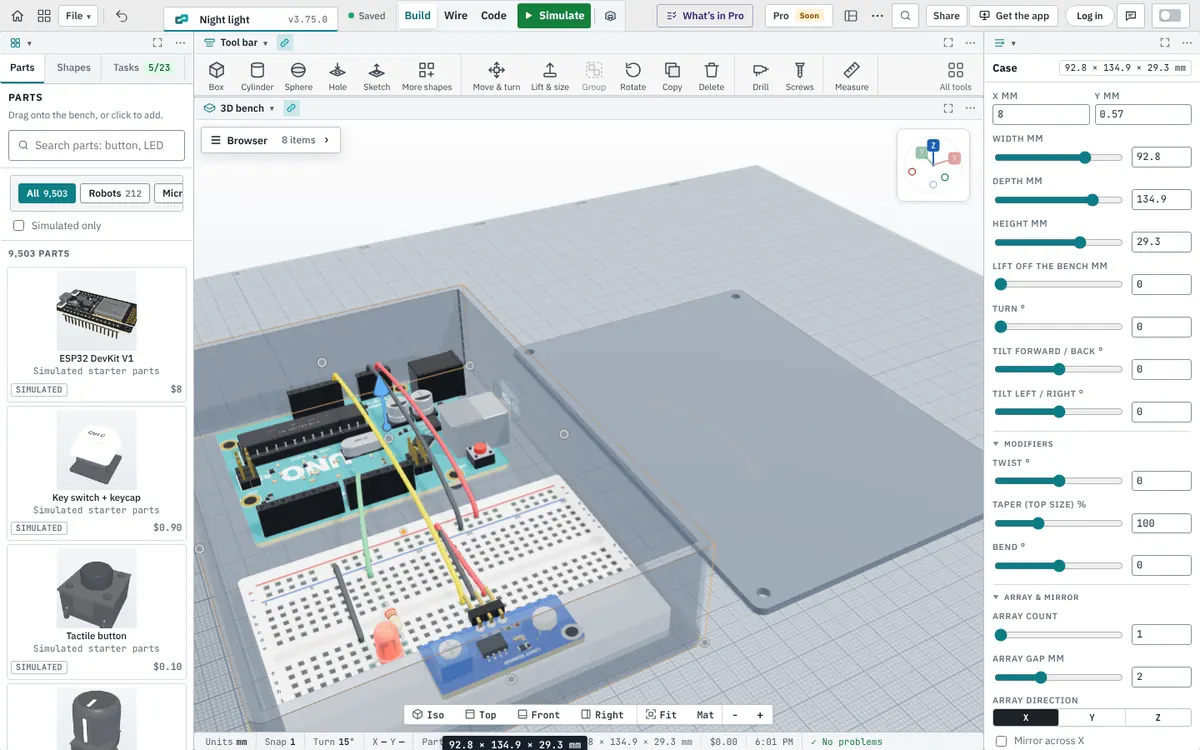
CAD and electronics on one bench
Most CAD tools don’t know what goes inside the box. In BenchTwin the boards and parts are already on the bench at their real size, so you design the enclosure around them: the USB opening lines up with the real connector, the screw holes line up with the board’s mounting holes, and you can see the wires before you close the lid.
Sketch and extrude
Press X to sketch on the bench, on a standing plane, on the top of a body or on any face you pick. Draw lines, arcs, rectangles, rounded rectangles, circles, polygons and slots, type exact sizes as you draw (for example 40,25), use construction lines as guides, and choose whether each shape adds material or cuts a hole. Then extrude it into a new body or cut it into the bodies below, up or down, by the distance you type in millimetres.
Shapes, holes and hardware
| Tool | What it does |
|---|---|
| 22 shapes | Box, cylinder, cone, sphere, dome, pyramid, wedge, hex and polygon prisms, ring, tube, rounded box, enclosure, mounting plate, star, half cylinder, slot, capsule, spring, vase, torus knot and screw hole |
| Body / Cut | Any shape can add material or cut it away from what it overlaps |
| Screw holes and Drill | Real threaded holes from M2 to M12, and drilled holes: threaded, clearance, pilot holes for self-tapping screws and holes for heat-set inserts |
| Screws | Pan-head, socket-cap, countersunk and self-tapping screws, nuts, nylock nuts, washers, standoffs and heat-set inserts, M2 to M5, with the right length worked out for you |
| Arrange | Move and turn by exact numbers, align, mirror, pattern copies, group, and Tidy up the bench |
| Measure | Measure between corners, edges and faces, and show the size of any part |
| Edit Mode | Edit vertices, edges and faces: extrude faces, subdivide, smooth and soft (proportional) editing |
An enclosure in one click
Auto case (Shift + C) builds a 3D-printable enclosure around your circuit with a lid and a USB opening. Resize it in Properties, cut extra openings with a slot, and export it.
Import and export
- Import STL, OBJ, GLB, glTF and PLY files, and robots or CAD assemblies as URDF, STEP or IGES, with joints you can move.
- Export your shapes as an STL for 3D printing, or a picture of the bench.
Questions
Is there free CAD software that runs in the browser?
Yes. BenchTwin’s 3D design tools run in your browser with nothing to install, and they are free while BenchTwin is in beta.
Can I export an STL for 3D printing?
Yes. The STL tool downloads your shapes as an STL file.
Can I import STEP files?
Yes, as a robot or CAD assembly (URDF, STEP or IGES). Single meshes import as STL, OBJ, GLB, glTF or PLY.
Does it make real screw threads?
Yes. Screw holes cut real threads from M2 to M12 where they overlap a body, and the Drill tool makes threaded, clearance, pilot and heat-set insert holes.
Is it a replacement for Fusion or Onshape?
Not for big mechanical projects. It’s made for designing around electronics: enclosures, mounts and robot parts, next to the circuit that goes inside.
More from BenchTwin
- Microcontroller simulatorArduino, ESP32, Pico and more on a 3D bench
- Arduino simulatorUno, Nano, Mega and Uno R4 with real libraries
- ESP32 simulatorWi-Fi, Bluetooth, ESP-NOW and I²S
- Raspberry Pi Pico simulatorPico, Pico W and Pico 2 with Arduino code
- Circuit simulatorBreadboards, currents, multimeter and scope
- Robot simulatorFTC, FRC, VEX and LEGO SPIKE on a field