BenchTwin › Raspberry Pi Pico simulator
Raspberry Pi Pico simulator
Wire a Raspberry Pi Pico, Pico W or Pico 2 to sensors, displays and radios on a 3D bench and run your code with the Pico’s real GP pin numbers, in your browser and for free.
Open BenchTwin, free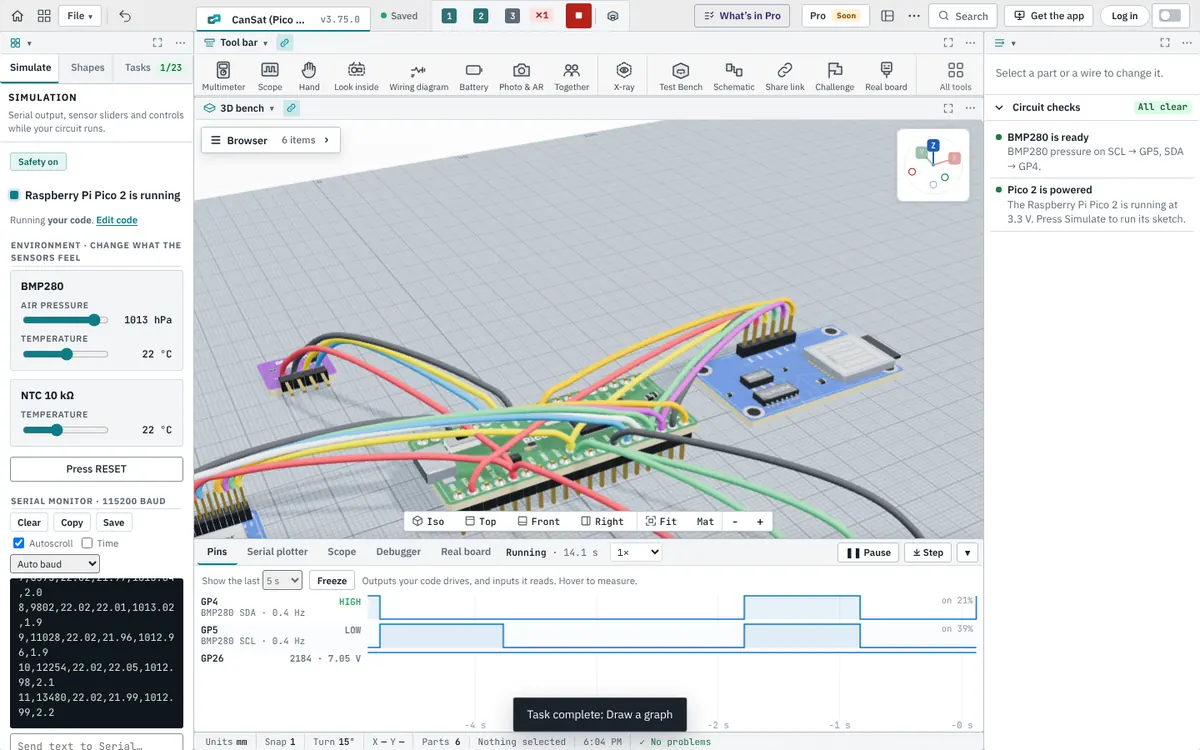
Pico boards
The Raspberry Pi Pico, Pico H, Pico W, Pico WH, Pico 2 and Pico 2 H, and other RP2040 boards. Their pins are named the way the board prints them: GP0 to GP28, the three ADC inputs on GP26, GP27 and GP28, 3V3, VSYS and VBUS, and the RUN and 3V3_EN pins.
Arduino code on the Pico
BenchTwin runs Arduino-style C++ on the Pico, as with the Arduino-Pico core: pinMode(15, OUTPUT) means GP15, analogRead(26) reads ADC0, and I²C, SPI and Serial1 use the Pico’s own default pins. The libraries that work on the other boards work here too: displays, sensors, NeoPixels, servos, radios and SD cards.
A real project: a CanSat
The CanSat starter project puts a Pico 2, a BMP280 pressure sensor, an NTC thermistor, an SX1278 LoRa radio and a microSD card in a can-sized build, logs readings to the card and sends them over LoRa. Change the air pressure and the temperature with the sliders and watch the altitude and the log change. When it works, Build it for real gives you the parts list and the wiring.
Checks that save a board
The Pico is a 3.3 V board, and its pins are not 5 V tolerant. BenchTwin warns when a 5 V module drives a Pico pin, when an LED has no resistor, or when a sensor is wired to pins that aren’t its bus, and explains how to fix it.
Questions
Is there a free Raspberry Pi Pico simulator?
Yes. BenchTwin simulates the Raspberry Pi Pico, Pico W and Pico 2 in your browser, free while it is in beta.
Can I run MicroPython in the Pico simulator?
No. BenchTwin runs Arduino-style C++ on the Pico. MicroPython isn’t simulated.
Which pins does the simulated Pico use for I²C and SPI?
The Pico’s defaults, as in the Arduino-Pico core. You can wire a sensor to the pins your code names, and BenchTwin checks that the wiring matches.
Can I simulate a Raspberry Pi 4 or 5?
Not yet. The Raspberry Pi 4 and 5 run Linux, not Arduino sketches, so in BenchTwin they are wiring-only parts.
More from BenchTwin
- Microcontroller simulatorArduino, ESP32, Pico and more on a 3D bench
- Arduino simulatorUno, Nano, Mega and Uno R4 with real libraries
- ESP32 simulatorWi-Fi, Bluetooth, ESP-NOW and I²S
- Circuit simulatorBreadboards, currents, multimeter and scope
- Online CADEnclosures, mounts and robot parts, to STL
- Robot simulatorFTC, FRC, VEX and LEGO SPIKE on a field