BenchTwin › Circuit simulator
Online circuit simulator, on a 3D bench
Build circuits the way you would on your desk: real parts, real breadboards, real wires. BenchTwin works out the voltages and currents, tells you what each part is doing, and warns you before something would burn.
Open BenchTwin, free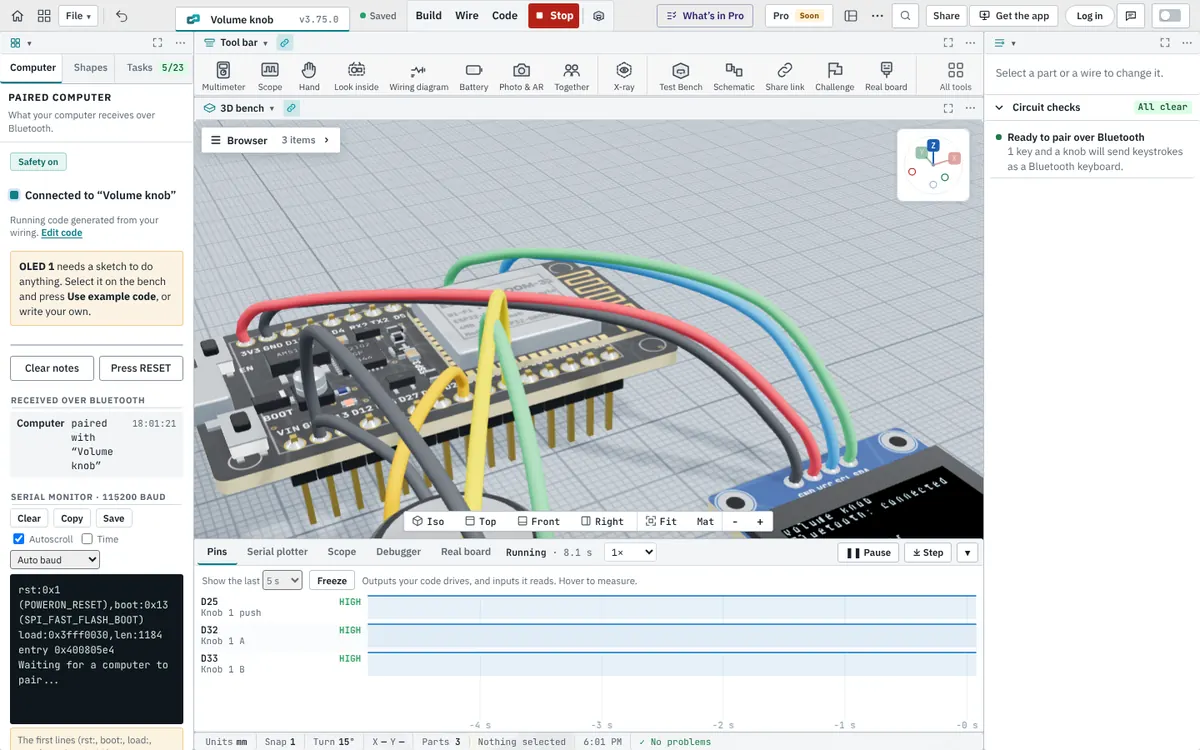
Circuits that behave like the real ones
Breadboards are connected like real breadboards: five holes in a row, the power rails along the sides, nothing across the middle gap. BenchTwin solves the circuit you wired, so an LED’s current depends on its resistor, a voltage divider really divides, and a part that would get too much current is flagged before it fails.
Plain-language circuit checks
The Circuit checks window explains each part in words. For example: “Red LED: 13.6 mA. (5.0 V − 2 V) ÷ 220 Ω = 13.6 mA. Safe for the LED and the pin.” When something is wrong, it says what will happen and how to fix it: an LED without a resistor, a sensor with no power, a 5 V signal on a 3.3 V pin, a module whose TX goes to TX.
Measure while it runs
- Multimeter: put its probes on the circuit while it runs.
- Oscilloscope and a pin timeline for PWM, serial data and signals that change.
- Battery life calculator: how long your battery lasts with what the circuit draws.
- Schematic and wiring diagram drawn from what you built, to print or share.
Parts
More than 9,000 real parts: resistors, capacitors, LEDs, diodes, transistors, regulators, buttons, switches, potentiometers, sensors, displays, motors, relays, batteries and power modules. Parts marked Simulated work while the circuit runs; the rest are wiring-only, so you can still plan the build and get the parts list.
Add a microcontroller when you’re ready
A circuit can run on its own, or with an Arduino, an ESP32 or a Raspberry Pi Pico running your code. The BenchTwin course starts with your first circuit and builds up from there.
Questions
Is this online circuit simulator free?
Yes, while BenchTwin is in beta. It runs in your browser with no download.
Does it simulate breadboards?
Yes. Breadboards, their rows and their power rails are connected like real ones.
Can I measure voltages and currents?
Yes. The multimeter measures the circuit while it runs, and the circuit checks show the current through each LED and what each pin gives.
Is it SPICE?
No. BenchTwin solves your circuit to show realistic voltages and currents for real parts and to catch mistakes, but it isn’t a SPICE simulator for transient analysis of analog designs.
More from BenchTwin
- Microcontroller simulatorArduino, ESP32, Pico and more on a 3D bench
- Arduino simulatorUno, Nano, Mega and Uno R4 with real libraries
- ESP32 simulatorWi-Fi, Bluetooth, ESP-NOW and I²S
- Raspberry Pi Pico simulatorPico, Pico W and Pico 2 with Arduino code
- Online CADEnclosures, mounts and robot parts, to STL
- Robot simulatorFTC, FRC, VEX and LEGO SPIKE on a field